
Download SubsGPT – Efficient Subtitle Translation Tool
Overview of SubsGPT
SubsGPT is a cutting‑edge AI‑driven subtitle translation solution that leverages the power of Generative Pre‑Training Transformer (GPT) models to deliver fast, accurate, and context‑aware translations. Designed for subtitle translators, filmmakers, and digital content creators, this tool excels at converting informal language nuances across a broad range of language pairs – for example, turning colloquial Russian phrases into equally informal Portuguese. The software accepts standard .srt files, allowing you to upload entire subtitle tracks and receive batch translations in a single operation.
Its user‑friendly interface supports JSON‑based interaction, guaranteeing that the structure of the output mirrors the input, which simplifies downstream editing and integration. With a focus on security, SubsGPT processes files locally (or in a trusted cloud environment) and provides a one‑click download of the translated subtitle file, ready to be embedded into any video project. Whether you are localizing a Netflix‑style series, preparing educational videos for a multilingual audience, or simply need a reliable tool for personal projects, SubsGPT offers a seamless blend of speed, reliability, and linguistic finesse that sets it apart from traditional subtitle translators.
Key Features and Simple Installation Process
Core Feature List
- AI‑powered translation using advanced GPT models.
- Support for informal language, slang, and regional idioms.
- Batch processing of .srt subtitle files.
- JSON‑based interaction ensuring symmetrical input‑output structures.
- One‑click secure download of translated subtitles.
- Multi‑language support covering over 30 language pairs.
- Integrated preview mode to review translations before finalizing.
- Lightweight desktop client for Windows, macOS, and Linux.
- Automatic updates to keep the translation engine current.
- Extensible API for developers who want to embed translation into custom workflows.
Installation & First‑Time Use
Installing SubsGPT is straightforward and requires no technical background. Begin by visiting the official download page and selecting the installer that matches your operating system (Windows, macOS, or Linux). The installer is signed with a trusted certificate, ensuring a secure download. After launching the installer, follow the on‑screen prompts: accept the license agreement, choose an installation folder, and let the wizard copy the necessary files. Once installation completes, launch the application from the desktop shortcut or start menu.
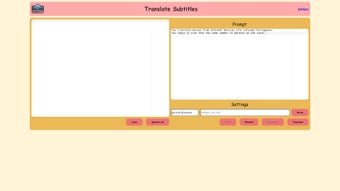
The first launch will present a brief onboarding wizard that helps you configure essential settings, such as default output folder, preferred language pairs, and API key entry (if you opt for the cloud‑enhanced translation mode). You can also toggle between offline and online processing based on your privacy preferences. After configuration, the main dashboard appears with a clear Upload .srt button, a language selection dropdown, and a Translate command.
Drag and drop your subtitle file, select the source and target languages, and hit Translate. The AI engine works in the background, usually completing a standard 90‑minute episode within minutes. When the process finishes, a Download button appears, allowing you to save the translated .srt file directly to your project folder.
Compatibility Details and Balanced Pros & Cons
Operating System Compatibility
SubsGPT is built with cross‑platform compatibility in mind. The desktop client runs natively on:
- Windows 10 and later (64‑bit).
- macOS 11 (Big Sur) and later.
- Popular Linux distributions (Ubuntu 20.04+, Fedora 33+, Debian 10+).
For users who prefer mobile solutions, a companion web app is available, providing full translation capabilities from any modern browser on Android or iOS devices. The web version uses the same secure backend, ensuring consistency across platforms.
Pros
- High accuracy: GPT‑based engine captures informal speech and idiomatic expressions.
- Speed: Batch processing translates full subtitle tracks in minutes.
- Security: Local processing option keeps sensitive content offline.
- Ease of use: Intuitive UI with drag‑and‑drop functionality.
- Scalability: API access for integration into larger production pipelines.
Cons
- Initial download size (~150 MB) may be large for low‑bandwidth environments.
- Advanced language pairs (beyond the 30‑plus core set) require a paid subscription.
- Offline mode relies on the latest model snapshot; occasional internet connection needed for updates.
- Linux installation may require manual dependency resolution on less common distros.
- Learning curve for developers using the API, though documentation is comprehensive.
Frequently Asked Questions & Final Thoughts
Can SubsGPT handle subtitles with embedded formatting tags?
Yes. SubsGPT preserves HTML‑like tags (e.g., , ) and timing codes during translation, ensuring the visual layout remains unchanged.
Is there a free version or trial period?
A fully functional free tier is available, allowing up to 3 subtitle files per month. A 14‑day trial of the premium plan unlocks unlimited translations and advanced language pairs.
How does SubsGPT protect my copyrighted video content?
When using the offline mode, all processing occurs on your local machine, meaning no data leaves your computer. The cloud mode encrypts files in transit and deletes them from the server immediately after translation.
Can I customize the translation style (formal vs. informal)?
Yes. The settings panel includes a tone selector where you can choose “formal,” “neutral,” or “informal” to match the desired audience.
Does SubsGPT integrate with popular video editing software?
While there is no direct plug‑in, the exported .srt files are compatible with Adobe Premiere Pro, Final Cut Pro, DaVinci Resolve, and other editing suites. The API also allows developers to build custom integrations.
Conclusion – Should You Download SubsGPT?
In the rapidly expanding world of multilingual video content, having a reliable subtitle translation tool is no longer a luxury—it’s a necessity. SubsGPT delivers a compelling mix of AI accuracy, speed, and user‑centric design that makes it suitable for both hobbyist translators and professional post‑production houses. Its ability to understand informal speech, preserve formatting, and operate securely either offline or in the cloud addresses the most common pain points in subtitle localization. While the free tier provides a solid entry point, serious users will benefit from the premium plan’s unlimited capacity and extended language coverage. Overall, if you’re looking for a secure, fast, and context‑aware subtitle translation solution that integrates smoothly into existing workflows, downloading SubsGPT is a smart move.
Overall Rating: 4.6 / 5
SubsGPT stands out for its balance of cutting‑edge AI translation and practical usability. The only drawbacks are the larger initial download size and the need for a paid subscription for the most exotic language pairs. For the majority of subtitle translation tasks, especially those involving informal dialogue, it exceeds expectations.



.png)



